Category Archives: Product Reviews

I think therefore I buy. Verdict and justification of my purchase

Nexus 7 (2013)

image

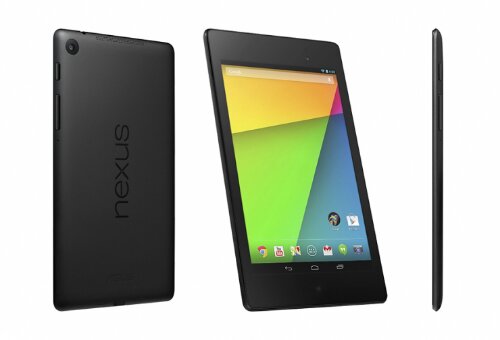
Finally the wait is over, I bought my first tablet. I’ve been waiting for the right one for over a year, I want a tablet with powerful specification and yet at a reasonable price. The iPad is way over my budget, and I don’t like the gimmicky line-up from Samsung. The first Nexus 7 almost meet my requirements, but I want a better display and a more powerful CPU.

The new Nexus 7 is just the right answer. It has higher pixel density than Apple’s retina display, the same resolution as my 24″ monitor. The CPU is top of the line quad core Qualcomm processor, on par with the flag ship smartphones like Galaxy s4 or HTC one. I bought the 16G model since the 32G model is not yet available in Canada, and lack of a micro slot is probably the biggest down side of the nexus 7. I intend to use it mostly at home, where I can stream files directly from my computer, so I am not very concern about the storage size. When I am traveling, I am get an USB cable and use external thumb drive, it is not very elegant but it works fine.

I pre-order my Nexus 7 from Bestbuy.ca and I got my tablet delivered right on July 30th, the first day that the Nexus 7 is on sale. (It already sold out, for now) I ready have an Android phone, so setting up the Nexus 7 is pretty straight forward. Log into my Google account and all my existing apps are downloaded and installed automatically. The tablet is up and running within 10 minutes. It feels just like my old phone, except it runs much smoother and has a bigger screen. I can’t tell anything real different in the new Android 4. , in fact I miss those little handy customization of Cyanogenmod 10.1, such as lock screen shortcuts, scrollable dock bar, etc.

The Nexus 7 lacks the wow factor, when I show it off to my colleagues, their comment is yet another Android tablet. My wife is not impressed by its relatively small size, she thinks only a 10″ iPad is a real tablet. It seems the only person fascinated by the Nexus 7 is baby Marcus, he prefer it over my old Android phone and mom’s iPhone 5, probably just because the Nexus 7 is bigger. I am quite happy with my new tablet, I don’t have to sit in front of the computer to surf the web or watch video. I am actually writing this blog using the tablet lying on the sofa. Typing with the on screen keyboard is not as fast as using a real keyboard, but good enough for light usage.

I am looking for a few accessories for my Nexus 7. First I need case and cover if I want to carry it with me outside of the house. Then I need to get a Bluetooth keyboard, so I can replace my laptop for simple note taking or writing tasks. Last I want to get a USB docking station to charge the tablet on my desk.

Windows MCE Remote + Windows Media Center + Media Browser

I hooked up my old computer to the TV in the living room to watch downloaded movies and TV. For a very long time, I used it like a normal computer with keyboard and mouse. However the typical computer user interface is not designed for a dad holding a baby. I need a more user friendly solution to use the computer on the TV. I bought this generic made-in-China Windows MCE remote on eBay for $12. Any MCE remote properly works or less the same. I like this one because it is cheap and I can control the mouse cursor and buttons through the remote.

The MCE remote works with the Windows Media Center (WMC) comes with Windows 7 installation. It is pretty much a full screen media library browser and multi-media player. WMC on its own is pretty useless other than showing baby photos. With the help of just a few plug-ins and free software, I can turned my download library into something looks like Netflix.

First, I installed K-Lite Codec Pack, both the 32 bit and 64 bit version, since WMC in runs 64 bits. This Codec allow me to play pretty much any media files inside WMC. Then I installed Media Browser, so WMC can display files in my media library. The WMC built-in movie library only recognize Microsoft file formats and ripped DVDs. However, it can only display the filenames and directory by default. It does not know which file is what movie. To add the final touch, I ran Media Scout to set up the metadata for my media files. It pulls the movie title, description, poster and all sorts of information from imdb.

Now I can sit back and relax in the couch, browse my movie library at ease while holding the baby with one hand.

Canon PowerShot S100

My trust old Canon SD-500 is not good enough to take baby photos. I desperately need a new pocket size camera. A large DSLR is not very convenient to carry around while you have to take care of a baby. I have been waiting for the price drop of Canon S100, which was its flag-ship pocket size camera. It has large 2.0 aperture at 2.0, high ISO 16000 and fast focusing and shutter speed, which is important to capture the moment in all lighting conditions.

The new S110 came out and the S100 drops to $330. The S110 is a newer model, but the image capturing hardware is identical to S100, same aperture size, same sensor, same image processor. The only difference is S110 comes with new useless feature such as wi-fi and touch screen and takes out old useless feature in S100 such as GPS.

The initial batch of S100 has lens retraction problem that the lens may stuck in cold weather due to poor QC. The problem is fixed in newer S100, so I am not too worry about this problem. Although it had affected my friend’s S100 and it’s a pretty bad experience.

The control is pretty much the same canon standard camera pocket size controls. It has two extra ring control that makes selection faster. The most important of all is it can take decent picture without using flash in normal indoor lighting condition at night. The fast focus and shutter response time works almost as well as my big DSLR camera. Perfect to capture the interesting moment of the baby. As usual, there are tons of useless capture mode and filters built-in to the camera, like color shift, fish eye effects, winkle to shoot etc. However there is a few features that I actually found useful, such as high dynamic range, auto facial detection. It also support taking HD video, which is good enough to replace a standalone video camera.

In general, the S100 is a very good camera. Highly recommended. S110 is newer and may have more useless features, but it is also $100 more expensive. Although S100 is no longer the flag-ship pocket camera from Canon, but it definitely gives the best value for the money.

Wansview NC541W Wireless IP Camera

I was looking for a baby monitor, but most of full feature baby monitor are quite expensive. Good one with infrared night vision easily costs over $200 and it only comes with one screen, each extra screen costs at least $100.

When I was at the Richmond Night Market the other day, one stall caught my attention. It was selling generic made-in-China wireless IP camera. What a perfect baby monitor, it comes with everything I need. It has infrared night vision, remote control of the camera angle, two way audio and it only costs $80. I am sure I can find it cheaper at eBay, but for that price, why don’t I just give it a try.

It works like charm. The IP camera is very easy to setup, just plug it in, setup the WiFi password and it is good to go. The IP camera comes with software for PC and MAC that support multiple cameras at the same time and recording of the video. For extra screen, the IP camera also function as a mini webserver, so I can log into the IP camera and view the video feed from any computer or smartphone. If I set up the port routing in my modem, I can even see the video when I am away from home.

The performance is better than I had expected. For 320×240 resolution, I get close to 15fps. The frame rate drops down to about 5fps for 640×480 resolution. The frame rate does not drop when I view the video both on my computer and my smart phone at the same time. The audio is clear and the night vision is pretty amazing. For $80, or even cheaper, it beats any baby monitor out there in the market.

Bluetooth mini keyboard

I have a Logitech wireless keyboard for my living room computer that hooks up to my TV. It is working fine for a long time but now I have a small problem. It is too big for me to hold the baby and type at the same time. Moreover, the keyboard is sitting on the coffee table when not used. If I bend over to pick it up with the baby sleeping on me, this motion makes the baby uncomfortable and very often wakes him up. I need a smaller wireless keyboard that is easy to use.

I got this Made in China Bluetooth mini keyboard on eBay fro $15. It is pretty small, smaller than my palm. The keys feel like cheap calculator, but it gets the job done. It is very easy to setup, just plug in the Bluetooth dongle and pair the device. I didn’t test explicitly the range of operation, but it works fine with the distance between the couch and the TV. It uses built-in Li-ion battery that charges via micro USB cable. The battery can last 3-4 hours of non-step use when fully charged. Since I usually only need to type in something quick, the battery can last pretty long if I remember turn off the keyboard after each use.

With this latest addition, now my baby station is fully equipped. It is a rocking recliner chair with very comfortable armrest and built-in footrest. There has a pouch sitting on armrest that enables me to have full control of the TV and the living room computer within arms reach. The pouch houses the TV remote, the cable box remote, a wireless mouse and the Bluetooth mini keyboard. Now I can keep myself entertained even if I have to hold the baby for the whole night.