Category Archives: Product Reviews

I think therefore I buy. Verdict and justification of my purchase

Crucial M4 SSD (256MB with data transfer kit)

I just upgrade my old computer with a SSD drive and 16GB of RAM. It is the best upgrade I have ever had, I feel like getting a new computer. My 2 years old i5 is performing faster than a brand new i7 with old fashion hard drive. After installing the SSD, Windows boot up in less than 20 seconds, much faster compare to 2-3 minutes before I got the SSD.

The Crucial M4 SSD got a very good rating from Tom’s Hardware SSD review. Although it is slightly slower than Intel or Samsung, but it deliver the best value for the money. Actually, there isn’t much noticeable difference in all the latest generation SSD from the big brand names. Most of them use the same controller from Sanforce and the same NAND flash technology. I bought the Crucial M4 only because it is on sales at NCIX.

I am too lazy to reinstall my Windows, so I bought a SSD big enough to copy all the files of the OS and the installed programs. My SSD comes with a data transfer kit, it is just a USB to SATA cable with the hard drive imaging software. You cannot just copy the files from your old HDD to SSD directly, because SSD use 4k partition. The transfer is pretty simple, shrink my original hard drive to less than 256MB by moving music and video files elsewhere, then run the program to clone the remaining files. With the USB transfer kit, I can make sure the is new SSD is alive before I open the case and messing around with cables.

Windows 7 boots up without any trouble in the new SSD. However, my Windows was installed on a HDD, I have to change a few settings to optimize the OS for SSD following the easy steps in SSD Optimization Guide. The general idea is pretty simple. SSD is flash memory, it has a limited write life cycle, so you have to limited unnecessary write operations to extend its life span. For example, the optimization includes disable disk defrag utilities, get more RAM and turn off the page swap file, enable TRIM to mark delete data, move the indexing file to a HDD, etc.

I am very happy with the new SSD. My computer is running lightening fast. If you haven’t got a SSD, I strongly encourage to get one. Price of SSD had fallen a lot in the past year, it is now within an affordable range. Upgrading to a SDD will be the best upgrade to your computer ever, you will get more performance than any other upgrade.

Kobo Touch eReader

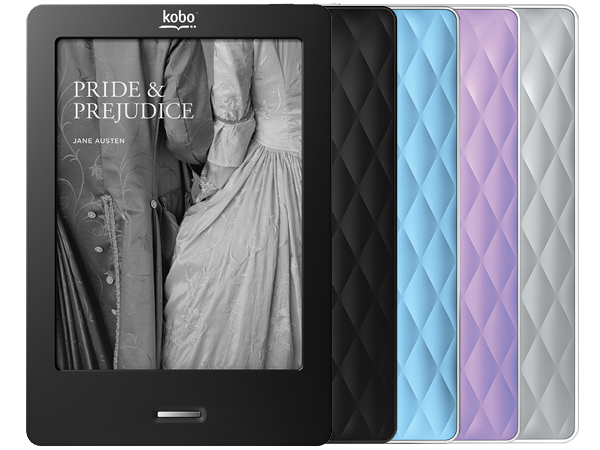
I wanted to buy an ebook reader for a while. I researched the pros and cons of the Kindle, Nook and Kobo quite a bit already. I have been hold off for waiting the price to come down. Out of my surprise, Pat bought me an ebook reader as my first father’s day gift. The Kobo Touch is on sales on father’s day for only $89, which is a very good deal.

Although the Kobo suppose to be my father’s day gift, Pat use it more often than me. When you are holding a baby, your activities are very limited. You cannot effectively surf the web or do any activities that require lots of hand movements. Pretty much the only activities available are watching TV, playing the smartphone and reading a book. The ebook reader is light and easier to flip pages than a real book. It is perfect to use when the baby is sleeping on you.

The Kobo uses the same 6″ E-Ink display as Kindle and Nook. The color of the screen looks like cheap paperback novels, but it is much easier to your eyes than traditional LCD screens. It claims 3 months battery life, but you will only get 3 months if you switch off the Wi-Fi. I found the Wi-Fi drain a lot of battery and it is pretty useless, unless you buy books from the kobo website. Amazon or B&N suppose to have a bigger selection of ebooks and better eco-system, but I found the Kobo store and its Chapters integration is good enough. We are able to find the baby books we want to buy. It comes with 2GB internal memory and a micro SD card slot, which is more than enough.

One thing I like about Kobo is it runs on a custom version of Linux. It is better than the striped down version of Android used by Kindle and Nook. It does not have any other features. It has a web browser, but it is barely usable. The Kobo comes with built in bookmark, highlight and annotation functions. User can use the on screen keyboard to type notes or share a paragraph on facebook. The on screen keyboard is too slow to make it useful, but the highlight function is quite handy. I am not planning to share anything on facebook or twitter, so I don’t care about the sharing feature.

There are some short coming of Kobo. It does not support Chinese out of the box. Installing Chinese font is pretty easy, just copy the TTF file over USB cable. The touch screen driver can crash if you press the the screen too quickly and the touch input is dead, you have to reboot the Kobo to bring it back up. The page refresh is a bit annoying but you will get use to it after awhile. There is no Wi-Fi sync between my computer and the Kobo, I can only load epub files using the USB cable. The Kobo desktop software is more like a store front for Kobo book store than a useful library management software. But it does not matter, just like everyone else, I use Calire to manage my ebooks. Calibre has a built in mini web server, so in theory I can download epub files over Wi-Fi using the Kobo browser, but I haven’t try it yet. I read from online review that Kobo suppose to have the better PDF support than Kindle and Nook. Yet in my opinion the PDF viewer in Kobo sucks. Yes, it can render the file correctly, it does not allow me to flip to next page when I am zooming in. It is better to convert the pdf file into epub using Calibre and load the epub file into Kobo.

In summary, Kobo is a single function device, it is pretty good at reading epub ebooks, but don’t expect it to do anything else.

Tasker for Android

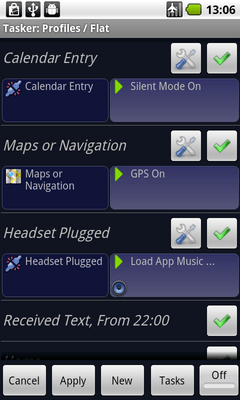
Tasker is the most powerful app in Android. It is a GUI base script engine for Android. User can performs different actions based on different trigger events, pretty much anything that the Android OS supports. With Tasker, you write a small script in 2 minutes which pretty much does the job of a silly app that costs $2.

Here are example some useful scripts idea for example. The phone can read the WiFi status to figure out I am at work and turn down the ringer volume. The phone will turn off 3G data and WiFi when the screen is off to save power, yet still kick off auto-sync every 30 minutes with data connection. Whenever I plug in the headphone, the phone will pop up a menu let me select which music player to launch and auto-play the music.

Here is the best script I have created so far. In case I lost my phone, I can sent an SMS to my phone. It will turn on GPS, get its location, use Google Map to convert GPS data into human readable address and send it back to me via SMS.

With Tasker, I can turn my phone into a fully automated personal assistant. In fact Tasker is the app that set Android apart from iPhone and represent the difference in design philosophy between iPhone and Android. Apple spoon feed iPhone user but never let them step outside of the fence. Google gives average Android users a phone close enough to iPhone, but it allows power users fully customize his phone to make it fun and productive. Once you had experienced the freedom and power of Android, you will never go back to iPhone.

Jabra CLIPPER

For a long time, I don’t understand why people buy a bluetooth stereo headphone. It is not a very big deal having the headphone wire between your ears and your phone. It turns out having a wire is very inconvenient when you want to listen to music to keep you awake while burping your newborn baby in the middle of the night . You simply cannot have any wire dangling or the baby will instinctively grep the wire.

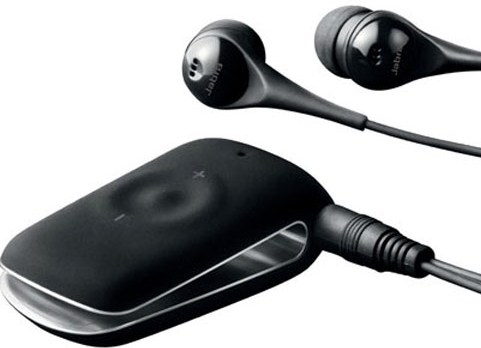
I need a small headphone and I want to able to wear it lying down as well, so it pretty much ruled out most of the chunky bluetooth headphones. I wanted to get Sony Ericsson HBH-IS800 at first, however it has pretty bad review, mainly very poor battery life. Then I come across the Jabra CLIPPER, whose biggest advantage is I can use any headphone I like. It is simply a bluetooth module with a 3mm headphone jack. It comes with a OK headphone, but I found the ear piece is not very comfortable, it tends to pop out sometimes. Other than that, it is pretty good sound quality and easy to use. It can be clipped on shirt and has 3 buttons remote control for the phone. The battery live is pretty good, it can last 6-8 hours according to the user manual. In my actual use, I can use it for 3-4 nights before charging depends on often the baby stay fussy.

Overall, I am quite happy with Jabra CLIPPER. It companies me for many sleepiness nights soothing the baby.

Air-O-Swiss 7144 Ultrasonic Humidifier

Although Vancouver winter rains a lot, but the weather is actually very dry. Every morning when I get up, my throat and nose feel dry and awkward. I decided to buy a humidifier so that I can sleep better at night. I have used a few different humidifiers before, the typical old design either one of two types. One type is simply a kettle, boil water to emit vapor. It is hot and noise. The other type is a sponge with a fan. It is dirty and noise, the sponge is very disguising after a while and it may grow bacteria.

There is a new type of humidifier that ultrasound to vaporize water molecules from water into the air. Since it does not boil water nor has a big fan, this type of humidifier is very quiet. I bought a Air-O-Swiss 7144 ultrasonic humidifier from Home Outfitter last week and I am very happy with the unit. It has a very elegant metallic design. It comes with digital hygrostat and sleep timer. It can emit warm mist at room temporary (40 C) or cool mist when the heating function turned off. I turn it on before I go to bed and it maintains an optimal humidity (50%-60%) over the night. I have to fill up the water tank once every two days, which holds about 12L of water.
This humidifier is almost perfect except a minor down sides. The water tank is a bit inconvenient to refill, since it does not fit under the sink. I have to fill it up in the bath tub. It requires its own brand of Ag+ demineralization cartridge that need to be replace every year and its own brand of descaler to clean the deposit at the ultrasound surface every 2-3 months, which is some extra cost.

Now my throat and noise feel a lot better in the morning. I recommend this humidifier to those who hate dry throat and nose in the morning and cannot stand the noise from traditional humidifiers.