Bluetooth mini keyboard

I have a Logitech wireless keyboard for my living room computer that hooks up to my TV. It is working fine for a long time but now I have a small problem. It is too big for me to hold the baby and type at the same time. Moreover, the keyboard is sitting on the coffee table when not used. If I bend over to pick it up with the baby sleeping on me, this motion makes the baby uncomfortable and very often wakes him up. I need a smaller wireless keyboard that is easy to use.

I got this Made in China Bluetooth mini keyboard on eBay fro $15. It is pretty small, smaller than my palm. The keys feel like cheap calculator, but it gets the job done. It is very easy to setup, just plug in the Bluetooth dongle and pair the device. I didn’t test explicitly the range of operation, but it works fine with the distance between the couch and the TV. It uses built-in Li-ion battery that charges via micro USB cable. The battery can last 3-4 hours of non-step use when fully charged. Since I usually only need to type in something quick, the battery can last pretty long if I remember turn off the keyboard after each use.

With this latest addition, now my baby station is fully equipped. It is a rocking recliner chair with very comfortable armrest and built-in footrest. There has a pouch sitting on armrest that enables me to have full control of the TV and the living room computer within arms reach. The pouch houses the TV remote, the cable box remote, a wireless mouse and the Bluetooth mini keyboard. Now I can keep myself entertained even if I have to hold the baby for the whole night.

心戰

想不到一套「心戰」,讓我重溫久違了追看電視劇集的快意。追電視劇不同煲電視劇,煲電視劇只是剛好手上有整套劇集,缺乏自制力下便一集接一集不停地看。追電視劇則是當劇集還在播放時,每晚放工回家乖乖坐在電視前,追看最新一集的劇情,看完一集後會心思思,去猜想明晚的一集會如何發展。

戚其義不愧為無記的金牌監製,上次「天與地」創做出港劇的神話,今次再下一城挑戰電視觀眾的極限,拍出一齣絕對另類的懸疑劇,男女主角全部心理變態大開殺戒,完全沒有一絲無線的婆媽公式。師奶觀眾看不慣收視自然差,但卻多了一班平時只看日劇美劇的網上觀眾,這套劇集的編劇拍得上外國片集的水準。

以下內容含有劇透,未看結局的朋友慎入,懸疑劇說穿了謎底,便沒有那樣好看了。

說在前頭,不只是一味把「心戰」捧到天上有地下無,劇情推理的確有犯駁之處,也時不時偶有悶場,但主線大橋真的讓人拍案叫絕。開場頭十集節奏很慢,要不是陳豪和鄭少秋兩大視帝坐鎮鬥戲,可能便中途放棄不看了。可是當開始連環殺人後,故事便精彩起來。我和老婆每晚也估誰是星期三殺手,給編劇地一而再,再而三地誤導,到發現邵美琪是真兇時,真不得不得寫它一個服字。邵美琪殺警察那一幕,一刀插入胸後叫他不要動,說流很多血會清潔很麻煩,邵美琪的神情語氣的演譯,應該可以拿視后。後來邵美琪自首自殺後,陳豪找鄭少秋復仇失敗,陳茵媺認作Tansy劇情峰迴路轉,又再一次給編劇欺騙,劇情真係完全你估我唔到。

導演的拍攝手法創新,劇中穿插鄭少秋與女兒的夢境相遇毀譽參半,我就覺得那些是悶場,但倒也不失為交待心底想法的新手法。陳豪與他的四個心魔,用五個演員合演一個角色,每個人代表內心不同的性格,絕對是神來之筆。片尾的沙畫詭異神秘,與劇集的主題互相配合,比其他只是映著藝員唱歌的片尾,格調高雅多了,像是在告訢觀眾,這套不是師奶戲,是另一層次的劇集。開放式的冚家剷結局更是高章,兩個男主角一個死一個瘋。無記劇集結局例牌BBQ,從另一個角度看這套也是BBQ結局耶。

Ozma 奧茲瑪

松本零士是科幻日本動畫殿堂級大師,「宇宙戰艦大和號」,「銀河鐵道999」,「千年女王」等等,無一不是當年陪伴我們成長的名字。在他旳眾多作品中,還有這套蒼海遺珠「奧茲瑪」,三十年前的企劃到今天終於重見天日,一共六集OVA作為Wowow社成立二十週年的記念作。

故事倒是很扎實的科幻背景,未日後的地球沙漠化。地面大部分由基因改造完美人的帝國控制,自然人只能在沙漠周邊苟且生活。主題是很行貨的環保訊息,完美人走進進化的死胡同,基因過度複製慢慢敗壞,不能適應環境的轉變。自然人雖然生活艱苦,但他們才是地球末來的希望。主角群則是松本慣用的海盜,只是把戰場從宇宙改為沙漠,太空船變了沙潛艇。

主線橋段老土到不得了,少年在沙漠救起謎之美女,引起帝國與海盜正面衝突。解謎的過程很王道,謎之美女剛巧是帝國公主,又有與沙漠巨獸溝通的能力,是地球再綠化的關鍵。敵方指揮官又剛好是主角的哥哥,美女艦長的戀人,被捉了去洗腦重置人格,在最後關頭記憶又回來了。中間那兩場沙潛艇戰很好看,只是主角們反敗為勝有點兒老梗。其他人物的演譯很公式化,海盜船上應有的角色也有,但除了用來湊數和講那些熟口熟面的對白外,他們完全沒有其他功用。想再說詳細點的劇情也沒法了,畢竟故事就是這樣單薄。

三十年前的動畫設定,在今天看起來有些過時。不知是否Wowow技術不足,還是刻意保留懷舊畫風,有些畫面拉時很礙眼,完全不似電腦輪助作畫。不過看慣了松本零士的老觀眾,倒也有一份親切感。特別是他的女主角多年來也同一個樣子,身材超瘦加長長的眼睫毛,每個都像是倒模印出來一樣。說起松本零士,我反而對新一套的「宇宙戰艦大和號2199」有興趣,看預告片中太空戰艦大戰的電腦動畫很壯觀啊。

Crucial M4 SSD (256MB with data transfer kit)

I just upgrade my old computer with a SSD drive and 16GB of RAM. It is the best upgrade I have ever had, I feel like getting a new computer. My 2 years old i5 is performing faster than a brand new i7 with old fashion hard drive. After installing the SSD, Windows boot up in less than 20 seconds, much faster compare to 2-3 minutes before I got the SSD.

The Crucial M4 SSD got a very good rating from Tom’s Hardware SSD review. Although it is slightly slower than Intel or Samsung, but it deliver the best value for the money. Actually, there isn’t much noticeable difference in all the latest generation SSD from the big brand names. Most of them use the same controller from Sanforce and the same NAND flash technology. I bought the Crucial M4 only because it is on sales at NCIX.

I am too lazy to reinstall my Windows, so I bought a SSD big enough to copy all the files of the OS and the installed programs. My SSD comes with a data transfer kit, it is just a USB to SATA cable with the hard drive imaging software. You cannot just copy the files from your old HDD to SSD directly, because SSD use 4k partition. The transfer is pretty simple, shrink my original hard drive to less than 256MB by moving music and video files elsewhere, then run the program to clone the remaining files. With the USB transfer kit, I can make sure the is new SSD is alive before I open the case and messing around with cables.

Windows 7 boots up without any trouble in the new SSD. However, my Windows was installed on a HDD, I have to change a few settings to optimize the OS for SSD following the easy steps in SSD Optimization Guide. The general idea is pretty simple. SSD is flash memory, it has a limited write life cycle, so you have to limited unnecessary write operations to extend its life span. For example, the optimization includes disable disk defrag utilities, get more RAM and turn off the page swap file, enable TRIM to mark delete data, move the indexing file to a HDD, etc.

I am very happy with the new SSD. My computer is running lightening fast. If you haven’t got a SSD, I strongly encourage to get one. Price of SSD had fallen a lot in the past year, it is now within an affordable range. Upgrading to a SDD will be the best upgrade to your computer ever, you will get more performance than any other upgrade.

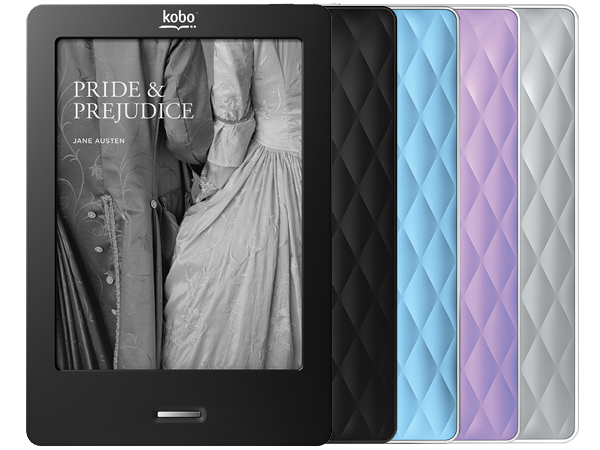
Kobo Touch eReader

I wanted to buy an ebook reader for a while. I researched the pros and cons of the Kindle, Nook and Kobo quite a bit already. I have been hold off for waiting the price to come down. Out of my surprise, Pat bought me an ebook reader as my first father’s day gift. The Kobo Touch is on sales on father’s day for only $89, which is a very good deal.

Although the Kobo suppose to be my father’s day gift, Pat use it more often than me. When you are holding a baby, your activities are very limited. You cannot effectively surf the web or do any activities that require lots of hand movements. Pretty much the only activities available are watching TV, playing the smartphone and reading a book. The ebook reader is light and easier to flip pages than a real book. It is perfect to use when the baby is sleeping on you.

The Kobo uses the same 6″ E-Ink display as Kindle and Nook. The color of the screen looks like cheap paperback novels, but it is much easier to your eyes than traditional LCD screens. It claims 3 months battery life, but you will only get 3 months if you switch off the Wi-Fi. I found the Wi-Fi drain a lot of battery and it is pretty useless, unless you buy books from the kobo website. Amazon or B&N suppose to have a bigger selection of ebooks and better eco-system, but I found the Kobo store and its Chapters integration is good enough. We are able to find the baby books we want to buy. It comes with 2GB internal memory and a micro SD card slot, which is more than enough.

One thing I like about Kobo is it runs on a custom version of Linux. It is better than the striped down version of Android used by Kindle and Nook. It does not have any other features. It has a web browser, but it is barely usable. The Kobo comes with built in bookmark, highlight and annotation functions. User can use the on screen keyboard to type notes or share a paragraph on facebook. The on screen keyboard is too slow to make it useful, but the highlight function is quite handy. I am not planning to share anything on facebook or twitter, so I don’t care about the sharing feature.

There are some short coming of Kobo. It does not support Chinese out of the box. Installing Chinese font is pretty easy, just copy the TTF file over USB cable. The touch screen driver can crash if you press the the screen too quickly and the touch input is dead, you have to reboot the Kobo to bring it back up. The page refresh is a bit annoying but you will get use to it after awhile. There is no Wi-Fi sync between my computer and the Kobo, I can only load epub files using the USB cable. The Kobo desktop software is more like a store front for Kobo book store than a useful library management software. But it does not matter, just like everyone else, I use Calire to manage my ebooks. Calibre has a built in mini web server, so in theory I can download epub files over Wi-Fi using the Kobo browser, but I haven’t try it yet. I read from online review that Kobo suppose to have the better PDF support than Kindle and Nook. Yet in my opinion the PDF viewer in Kobo sucks. Yes, it can render the file correctly, it does not allow me to flip to next page when I am zooming in. It is better to convert the pdf file into epub using Calibre and load the epub file into Kobo.

In summary, Kobo is a single function device, it is pretty good at reading epub ebooks, but don’t expect it to do anything else.