All posts by hevangel

Kobo Touch eReader

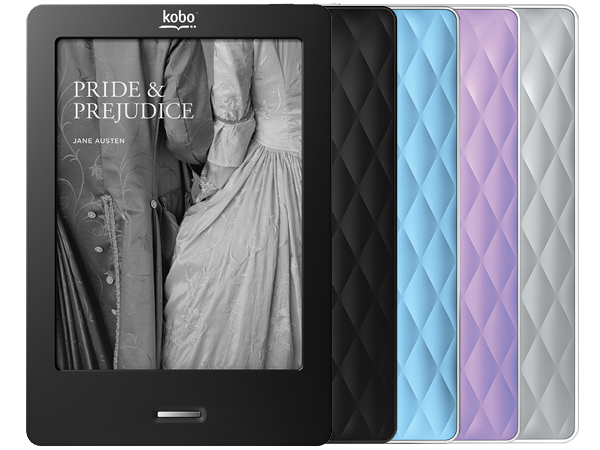
I wanted to buy an ebook reader for a while. I researched the pros and cons of the Kindle, Nook and Kobo quite a bit already. I have been hold off for waiting the price to come down. Out of my surprise, Pat bought me an ebook reader as my first father’s day gift. The Kobo Touch is on sales on father’s day for only $89, which is a very good deal.

Although the Kobo suppose to be my father’s day gift, Pat use it more often than me. When you are holding a baby, your activities are very limited. You cannot effectively surf the web or do any activities that require lots of hand movements. Pretty much the only activities available are watching TV, playing the smartphone and reading a book. The ebook reader is light and easier to flip pages than a real book. It is perfect to use when the baby is sleeping on you.

The Kobo uses the same 6″ E-Ink display as Kindle and Nook. The color of the screen looks like cheap paperback novels, but it is much easier to your eyes than traditional LCD screens. It claims 3 months battery life, but you will only get 3 months if you switch off the Wi-Fi. I found the Wi-Fi drain a lot of battery and it is pretty useless, unless you buy books from the kobo website. Amazon or B&N suppose to have a bigger selection of ebooks and better eco-system, but I found the Kobo store and its Chapters integration is good enough. We are able to find the baby books we want to buy. It comes with 2GB internal memory and a micro SD card slot, which is more than enough.

One thing I like about Kobo is it runs on a custom version of Linux. It is better than the striped down version of Android used by Kindle and Nook. It does not have any other features. It has a web browser, but it is barely usable. The Kobo comes with built in bookmark, highlight and annotation functions. User can use the on screen keyboard to type notes or share a paragraph on facebook. The on screen keyboard is too slow to make it useful, but the highlight function is quite handy. I am not planning to share anything on facebook or twitter, so I don’t care about the sharing feature.

There are some short coming of Kobo. It does not support Chinese out of the box. Installing Chinese font is pretty easy, just copy the TTF file over USB cable. The touch screen driver can crash if you press the the screen too quickly and the touch input is dead, you have to reboot the Kobo to bring it back up. The page refresh is a bit annoying but you will get use to it after awhile. There is no Wi-Fi sync between my computer and the Kobo, I can only load epub files using the USB cable. The Kobo desktop software is more like a store front for Kobo book store than a useful library management software. But it does not matter, just like everyone else, I use Calire to manage my ebooks. Calibre has a built in mini web server, so in theory I can download epub files over Wi-Fi using the Kobo browser, but I haven’t try it yet. I read from online review that Kobo suppose to have the better PDF support than Kindle and Nook. Yet in my opinion the PDF viewer in Kobo sucks. Yes, it can render the file correctly, it does not allow me to flip to next page when I am zooming in. It is better to convert the pdf file into epub using Calibre and load the epub file into Kobo.

In summary, Kobo is a single function device, it is pretty good at reading epub ebooks, but don’t expect it to do anything else.

Tasker for Android

Tasker is the most powerful app in Android. It is a GUI base script engine for Android. User can performs different actions based on different trigger events, pretty much anything that the Android OS supports. With Tasker, you write a small script in 2 minutes which pretty much does the job of a silly app that costs $2.

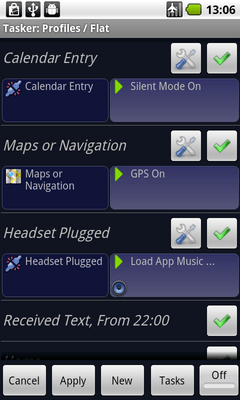
Here are example some useful scripts idea for example. The phone can read the WiFi status to figure out I am at work and turn down the ringer volume. The phone will turn off 3G data and WiFi when the screen is off to save power, yet still kick off auto-sync every 30 minutes with data connection. Whenever I plug in the headphone, the phone will pop up a menu let me select which music player to launch and auto-play the music.

Here is the best script I have created so far. In case I lost my phone, I can sent an SMS to my phone. It will turn on GPS, get its location, use Google Map to convert GPS data into human readable address and send it back to me via SMS.

With Tasker, I can turn my phone into a fully automated personal assistant. In fact Tasker is the app that set Android apart from iPhone and represent the difference in design philosophy between iPhone and Android. Apple spoon feed iPhone user but never let them step outside of the fence. Google gives average Android users a phone close enough to iPhone, but it allows power users fully customize his phone to make it fun and productive. Once you had experienced the freedom and power of Android, you will never go back to iPhone.

How to Lie with Statistics – Darrell Huff

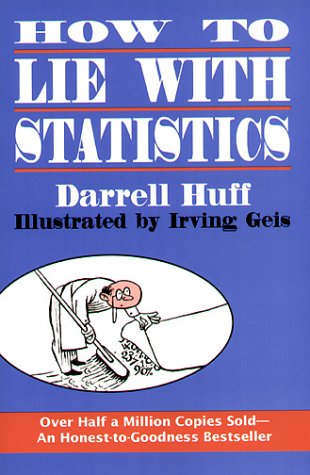
這本小書面世六十年,內容簡單易明,配合有趣的例子和插圖,可以說是統計學入門的經典書藉。因為年代久遠兼全書只有百多頁,網上找到很多不同版本下載,看完書評有興趣看的讀者,可以按此文章末的連結。

這本小書台灣譯作「別讓統計數字騙了你」,大陸則譯作「統計陷阱」,不過還是英文原名傳神「如何用統計學去說謊言」。這本書不是全心教人用統計學說謊,而是指出在報章雜誌廣告中,常常出現的統計學說謊招數,好讓我們知道了可以防範。正所謂「橋不怕舊,最緊要受」,書中的說謊招數,經過了六十年依然盛行,一不小心便被欺騙了。當然如果讀者的工作是廣告或公關,那可要奉這本書為職場天書,身體力行去實踐書中的招數搵食了。

書中歸納統計學說謊招數,總共八招,簡介如下。

第一招:採用有偏差的樣本,以求得上好看的數據。
第二招:濫用平均的歧義,總數除人數與中位數可以相差很遠。
第三招:實驗樣本太小,只要過瀘不利的數據,結論可以隨意決定。
第四招:實驗誤差太大,說了得於沒有說。
第五招:放大縮小圖表軸線的量度,可以巧妙地製做良好的錯覺
第六招:以圖示意,用一維的量度,跨大二維或三維的比例差距。
第七招:引用無關但真碓的數據,去推論出完全無關的結論
第八招:因果倒為,夾硬把兩個數字說成因果關係。

最後一章作者教讀者如何看穿不誠實的統計數字,每一次看到統計資料,我們可以問自已下面五條簡單問題。

問題一:誰說的?
問題二:他為什麼知道?
問題三:他說漏了什麼?
問題四:有沒有偷換議題?
問題五:結論是否合理?

這是一本很實用的書藉,下次再看見統計數字在宣傳什麼東西時,大可以應用書中教的招數,一眼看穿廣告商或政治的騙局。事實上你會發現,日常生活接觸到的統計數字,絕大部份不是廢話便是謊言。明明便很易容識破,可是偏偏世人卻總是愚昧地一再上當。

Download pdf of How to Lie With Statistics

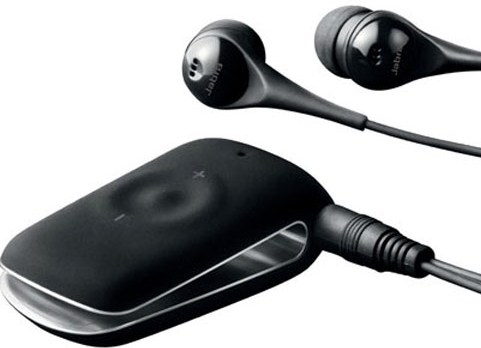
Jabra CLIPPER

For a long time, I don’t understand why people buy a bluetooth stereo headphone. It is not a very big deal having the headphone wire between your ears and your phone. It turns out having a wire is very inconvenient when you want to listen to music to keep you awake while burping your newborn baby in the middle of the night . You simply cannot have any wire dangling or the baby will instinctively grep the wire.

I need a small headphone and I want to able to wear it lying down as well, so it pretty much ruled out most of the chunky bluetooth headphones. I wanted to get Sony Ericsson HBH-IS800 at first, however it has pretty bad review, mainly very poor battery life. Then I come across the Jabra CLIPPER, whose biggest advantage is I can use any headphone I like. It is simply a bluetooth module with a 3mm headphone jack. It comes with a OK headphone, but I found the ear piece is not very comfortable, it tends to pop out sometimes. Other than that, it is pretty good sound quality and easy to use. It can be clipped on shirt and has 3 buttons remote control for the phone. The battery live is pretty good, it can last 6-8 hours according to the user manual. In my actual use, I can use it for 3-4 nights before charging depends on often the baby stay fussy.

Overall, I am quite happy with Jabra CLIPPER. It companies me for many sleepiness nights soothing the baby.

鋼之鍊金術師劇場版 – 嘆息之丘的神聖之星

「鋼之鍊金術師」前年番拍,砍掉了初次電視版的原創結局,按照漫畫版原裝結局,把後半部重新製作,大獲好評。接著乘勢推出新劇場版,吸取了上次劇場版「仙巴拉的旅人」的教訓,今次學精了不再賣弄很玄沒有人看得明的世界觀,而平實地說鋼錁兩兄弟在尋找賢者之石旅途中的外傳故事。與其說這是新版鋼鍊的劇場版,倒不如說是舊版鋼鍊的劇場版。尋找賢者之石在漫畫版並不重要,只不過是用來帶出主線國土鍊成陣的引子,鋼鍊兩兄弟要做拯救世界的正經事,也不再把找回身體這些小事整天掛在口邊。

這套電影的故事十分普通,在國境的城市發現賢者之石的線索,兩兄弟前往調查。其間遇到要復國的少女和難民的游擊隊,又引來帝國軍和敵國合成獸的襲擊。國境的城市原來是一個小型賢者之石鍊成陣,少女的父母因為破解鍊成陣的秘密被殺。少女打算借用賢者之石的力量復國,但她並不知道賢者之石用活人做原材料。在游擊隊發動反攻的時用,冒充少女死去的哥哥的壞人,借機發動鍊成陣把帝國軍士兵鍊成賢者之石。少女的直正哥哥又忽然出現,還投靠敵國成為心理變態的將軍,要用溶岩把當年趕走父母的難民趕盡殺絕。結局大打一場,最後邪不能勝正,兩兄弟打倒壞人救了難民,喚醒入了魔道的哥哥,而難民亦復國成功,少女救哥哥時用賢者之石作通行証,她看見到真理之門。炎之鍊金術師也有客串出場,帶了軍隊來收拾殘局。

新版鋼鍊的畫功已經十分精美,重要場面的質素與這齣電影比較也不遑多讓。這齣劇場版很有看電視的感覺,好像是把一個普通的兩集過場故事,拉長成為兩個小時的電影。電影的故事沒有帶來什麼新發展,不外是重彈等價交換的老調,作者似乎在食老本,搾乾鋼鍊的剩餘價值。